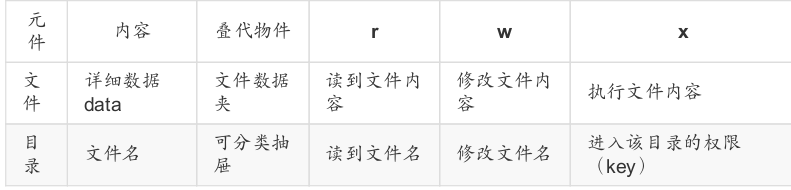
文件的权限管理很重要,那么如何改变文件的属性与权限呢?就需要要到下面的三个命令:
- chgrp :改变文件所属群组,change group的简写
- chown :改变文件拥有者,change owner的简写
- chmod :改变文件的权限, SUID, SGID, SBIT等等的特性
1.改变文件所属群组:chgrp [-R] 将要所属的群组 filename,-R参数是对一个目录下的所有文件进行递归更改。
1 | root@localhost:/tmp# ls -l |
但是要注意要改成的群组必须要在/etc/group中存在,也就是已经存在的群组。
2.改变文件拥有者:chown [-R] 帐号名称 文件或目录
1 | root@localhost:/tmp# chown huajian testfile |
chown也可以直接修改文件所属群组,chown [-R] 帐号:群组名称 文件/目录,只需用:进行分割即可,还可以用用户名.群组的形式。
1 | root@localhost:/tmp# chown root:root testfile |
3.改变文件权限chmod [-R] 将要更改的权限 文件或目录文件权限的改变使用的是chmod这个指令,但是,权限的设置方法有两种, 分别可以使用数字或者是符号来进行权限的变更。
数字类型改变文件权限:
owner/group/others三种身份各有自己的read/write/execute权限,各权限的分数对照表如下:
r:4 w:2 x:1
也就是如果要将owner的权限更改为rwx,则对应的数字为7也就是4+2+1.同理其他两个也是。
1 | root@localhost:/tmp# chmod 777 testfile |
上面的命令是将owner/group/others三者的权限全部设为rwx,当然这种更改权限的方式比较繁琐,每次都要去计算对应的数字,下面来看另一个更改权限的方式,字符更改。
符号类型改变文件权限:chmod u g o a | +(加入) -(除去) =(设置) | r w x |文件或目录 ,user group others三种身份啦!那么我们就可以借由u, g, o来代表三种身份的权限!此外, a 则代表 all 亦即全部的身份。这种方式通过+-=的方式进行权限的添加,去除,赋予。
1 | root@localhost:/tmp# chmod u=rw,go=r testfile |
我如果想单独加一个小的权限该怎么办呢?用上面的方式当然可以,还有更简单的,别忘了还有+-没用。
1 | root@localhost:/tmp# chmod g+w testfile |
上面的命令是我给文件所属群组单独加了一个写的权限,突然又不想加了,然后用-去除了写权限。
权限对目录的重要性:
r (read contents in directory):
表示具有读取目录结构清单的权限,所以当你具有读取(r)一个目录的权限时,表示你
可以查询该目录下的文件名数据。 所以你就可以利用 ls 这个指令将该目录的内容列表显
示出来!
w (modify contents of directory):
这个可写入的权限对目录来说,是很了不起的! 因为他表示你具有异动该目录结构清单
的权限,也就是下面这些权限:
- 创建新的文件与目录;
- 删除已经存在的文件与目录(不论该文件的权限为何!)
- 将已存在的文件或目录进行更名;
- 搬移该目录内的文件、目录位置。 总之,目录的w权限就与该目录下面的文件名异
- 动有关就对了啦!
x (access directory):
可以用cd进入该目录。
文件与目录权限: